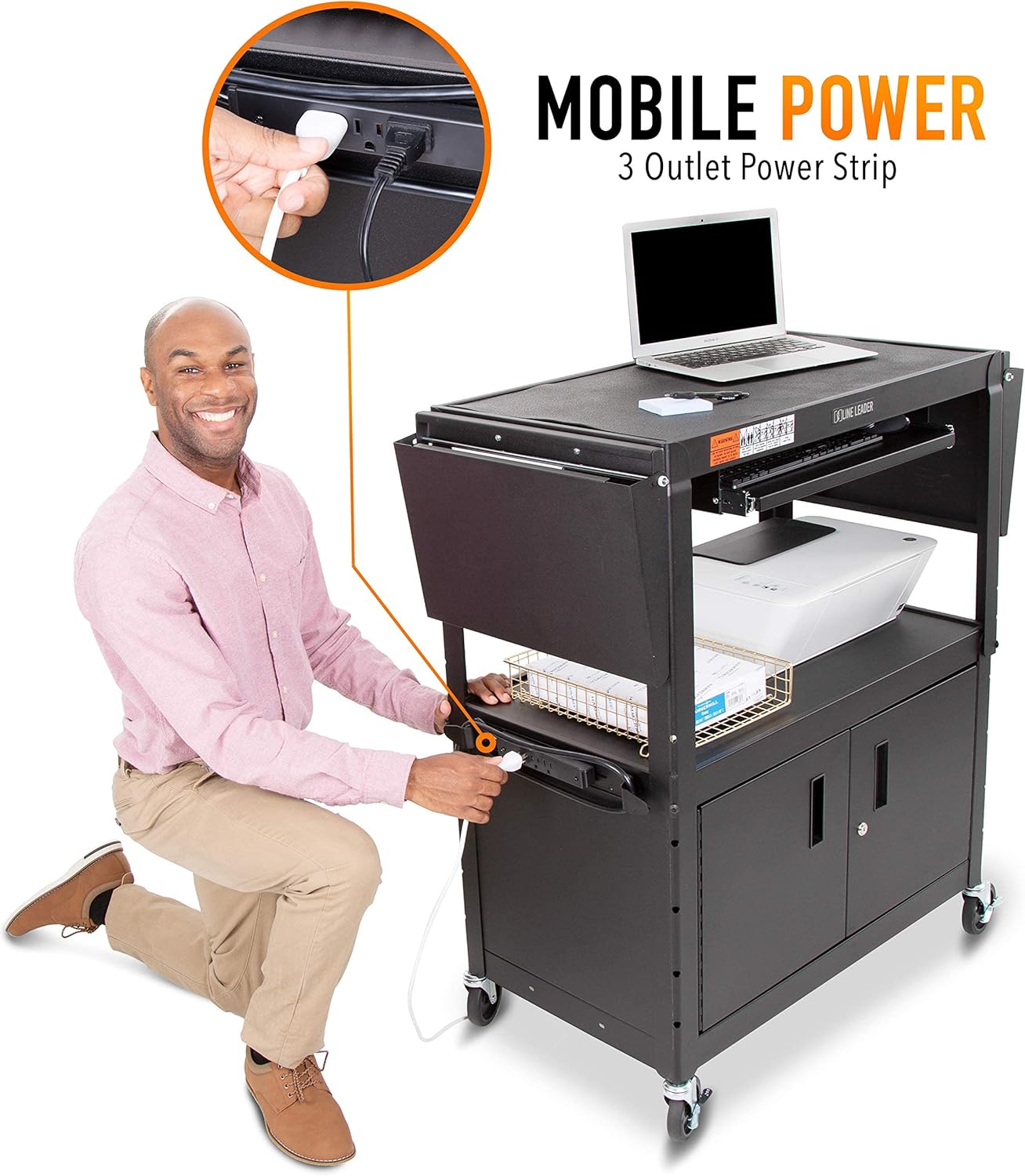
A rolling cart that holds a display screen or projector is called an AV cart — short for audio-visual cart, the wheeled stand that lets a teacher or presenter move a monitor or TV from room to room without a permanent wall mount. For years, that was the whole job description: hold the screen, don’t tip over, lock the wheels when you stop. But the classrooms, makerspaces (rooms equipped for hands-on building, coding, or creative projects), and multi-use activity rooms being built or retrofitted right now are asking a lot more from that same footprint. The cart sitting in the corner during morning announcements needs to become a charging station, a supply shelf, and sometimes a student workstation by second period. If you’re currently deciding whether to spec a purpose-built makerspace cart or stretch a traditional AV cart to do double duty, this guide surfaces the real tradeoffs — load ratings, surface dimensions, cable management, and total cost — so you can close the decision with confidence.
Why the Line Between “AV Cart” and “Activity Station” Has Blurred
Five years ago, a school’s AV budget and its makerspace budget lived in completely separate line items, purchased from completely separate vendors. That siloing is dissolving fast. Per ISTE’s 2024 update to their Essential Conditions for Technology Integration, districts are increasingly expected to demonstrate that devices and program materials move together — not in separate carts down separate hallways. A makerspace coordinator who needs a charging hub on wheels and a display for instructional video is essentially describing an AV cart with extra shelving. An IT director speccing monitor carts for rotating classroom use starts wondering, mid-quote, whether those same carts could hold a class set of Chromebooks and a 3D-printing filament drawer on the shelf below.
This convergence is good for buyers who know what they’re doing, and expensive for buyers who don’t. The risk is purchasing a $90 AV cart rated for 150 lbs of screen weight, then loading it with 60 lbs of supplies, a power strip, and a 65-inch display — and watching the caster bolts strip out in month three. The other risk is over-specifying: buying a $600 makerspace station when a $180 mid-range AV cart with an added utility shelf would have handled the program just fine.
The Spec Comparison That Actually Matters
Before brand names, two numbers dominate this decision: working surface height and total dynamic load rating (the weight the cart can safely carry while moving, as opposed to static load, which is the weight it can hold while parked).
By the Numbers
| Cart class | Typical surface height | Dynamic load rating | Price range (2026) |
|---|---|---|---|
| Basic AV cart (single-shelf) | 26–34 in. | 100–150 lbs | $60–$120 |
| Mid-range AV/utility hybrid | 32–38 in. | 150–250 lbs | $130–$220 |
| Dedicated makerspace station | 34–36 in. (standing work height) | 250–400 lbs | $350–$700 |
| Clinical/institutional activity cart | 34–36 in. | 300–500 lbs | $400–$1,200 |
That standing work height range — 34 to 36 inches — is not accidental. It aligns with ADA Standards for Accessible Design reach-range guidelines (U.S. Access Board), which specify that a forward-reach maximum of 48 inches and a clear floor space of 30 by 48 inches must be maintained for wheelchair users. If your makerspace or activity room serves students with mobility aids, surface height and aisle clearance are compliance issues, not just ergonomic preferences.
Casters: The Spec Everyone Under-Reads
Casters (the wheels at the bottom of a rolling cart) are where the cost-of-cheap conversation gets concrete. A $90 AV cart from an off-brand supplier typically ships with 2-inch nylon casters rated for roughly 50 lbs each. On hard floors and light loads, those last. The moment you add a 65-inch commercial display (around 80–100 lbs alone), a power strip, and a class set of supplies, you’re near or over rated capacity on every roll across a threshold or elevator seam. Caster failure on a loaded AV cart is not a minor inconvenience — it’s a falling-display liability event.
Flash Furniture’s AV cart line, per their 2025 product specification sheets, ships with 3-inch dual-wheel casters rated at 75 lbs each — four casters, 300 lbs total, with two locking. That’s a meaningful step up from the entry tier and explains why their mid-range carts appear in Wirecutter’s 2024 classroom AV cart coverage as a reliable mid-budget pick. Offex’s classroom utility cart documentation lists similar 3-inch caster specs on their three-shelf configurations, with a total capacity of 220 lbs dynamic — respectable for a cart in the $130–$160 range but not a cart you’d load a 75-lb commercial monitor onto and also stack supply bins.
Three Actual Use Cases and Which Cart Wins Each One
Use Case 1: Rotating Media Display in a K–8 Classroom ($80–$180 budget)
If the primary job is moving a 40–55 inch display (typically 40–60 lbs) between two or three classrooms and parking it against a wall for video instruction, a traditional AV cart handles this well — provided you match the screen weight to the cart’s dynamic rating with a comfortable margin (20–30% headroom is the right rule of thumb).
At this budget, the Offex three-shelf AV cart and the Flash Furniture mobile presentation cart are the two names that consistently appear in school purchasing records. Both offer cable management channels (built-in clips or grommets that route power cords to prevent tangling), which matters more than buyers expect until they’re managing fifteen students around a cart with a dangling cord at ankle height.
The Origami folding cart multi-shelf series, per their 2025 technical specifications, offers a different value proposition: it collapses flat for storage, making it a strong option for schools with limited closet space. The tradeoff is that Origami’s wire-grid shelves aren’t ideal for display equipment — the vibration transfer through wire mesh is higher than on solid MDF (medium-density fiberboard) shelves, and equipment should be secured with straps or hook-and-loop fasteners rather than relying on friction.
Decision rule: If screen weight is under 60 lbs and storage space is tight, Origami. If you need solid surface stability and the cart stays deployed most of the day, Flash Furniture or Offex.
Use Case 2: Dual-Purpose AV and Supply Station in a Makerspace ($200–$400 budget)
This is the convergence scenario described above — one cart that runs instructional video in the morning and becomes a supply distribution point during build sessions. The spec requirements jump considerably: you need a solid top surface that can handle a monitor and act as a clean working surface, a lower shelf deep enough for supply bins (at least 18 inches front-to-back), a power strip mounting point, and casters rated for 250+ lbs dynamic because you’re combining screen weight, supplies, and power equipment.
At this price point, the honest answer is that most branded AV carts max out and you’re shopping into the lower edge of dedicated makerspace furniture. Diversified Woodcrafts — a manufacturer with a strong track record in school library and makerspace furniture — produces a Makerspace Cart that, per their 2025 spec sheet, offers a 36-inch work surface, 400-lb capacity, solid birch construction, and a lower storage bay with optional bin dividers. At around $380–$420 depending on configuration and freight zone, it sits right at the top of this budget tier but delivers clinical-grade durability.
If $380 is over the ceiling, the mid-range Flash Furniture mobile workstation series (not the AV cart sub-line — the workstation sub-line, which has a different frame) gets you to 250-lb dynamic capacity with a 35-inch surface height and a keyboard tray that doubles as a secondary work surface. It won’t absorb the punishment of a daily makerspace, but for a program that runs two to three days a week, owners in aggregated reviews consistently report multi-year service life without caster or shelf issues.
Decision rule: If the program runs four or more days per week and involves tools, materials, or wet media, budget for Diversified Woodcrafts. If frequency is lower and the primary load is a screen plus light supplies, the Flash Furniture workstation variant covers you at roughly $180–$220.
Use Case 3: Activity Program Cart in a Senior Living or Therapeutic Setting ($400–$900 budget)
This use case diverges sharply from the classroom scenarios because the compliance requirements are non-negotiable and the cleanability standard is different. Carts in memory care units, sensory rooms, and long-term care facilities need to survive repeated wipe-downs with hospital-grade disinfectants without surface degradation. That rules out most laminate and wire-grid AV carts immediately — their surfaces and finish grades aren’t rated for repeated chemical exposure.
Clinically oriented buyers at this tier are typically specifying from Clinton Industries, Hausmann, or Medline — manufacturers whose carts are engineered for healthcare environments, with high-pressure laminate or thermoformed surfaces, antimicrobial options, and locking drawer systems. Per NCTRC (National Council for Therapeutic Recreation Certification) practice resources, activity directors in long-term care are increasingly expected to document equipment compliance with infection control protocols — making surface material specification a documentation issue, not just a purchasing preference. The organization ot-innovations.com has published guidance on adaptive activity cart setup that specifically flags the importance of matching surface chemistry to facility disinfection protocols.
The AV-cart-as-activity-station shortcut doesn’t hold here. A $150 cart that looked like a reasonable substitute in a classroom is a compliance gap in a care facility.
Decision rule: If the setting is healthcare-adjacent or serves a vulnerable population with active infection control protocols, don’t adapt an AV cart — specify from the clinical-grade tier from the start.
Funding Alignment: Connecting the Right Cart to the Right Grant Cycle
One practical note for buyers with a decision pending: DonorsChoose’s Technology and Science grant categories, per their 2025–2026 eligibility guidelines, cover AV carts and mobile workstations when they’re tied to a specific student project or technology integration outcome. If your use case is squarely in Use Case 1 or 2 above, framing the cart as infrastructure for a technology or STEM project — rather than furniture — significantly improves eligibility. The spring funding cycle (typically March–May) is the most competitive; fall submissions (September–October) often see better approval rates for equipment requests in the $150–$400 range.
ARPA (American Rescue Plan Act) education funds have largely been drawn down through 2025, but some districts are still in the expenditure window through late 2026. If your district still has unspent ESSER (Elementary and Secondary School Emergency Relief) allocations, AV and makerspace infrastructure qualifies — check with your district’s federal programs coordinator before that window closes.
The Decision Frame, Summarized
If you’re holding an LOI or a PO right now, here’s the clean version:
- Screen-only, under 60 lbs, under $180: Mid-range AV cart from Flash Furniture or Offex. Match dynamic rating to screen weight with 25% headroom. Check caster size — 3-inch minimum.
- Dual-purpose AV and supply, moderate use: Flash Furniture workstation variant at $180–$220 if frequency is low; Diversified Woodcrafts Makerspace Cart at $380–$420 if it’s a daily program.
- Healthcare or care facility: Skip the AV cart category entirely. Specify clinical-grade from Clinton Industries, Hausmann, or Medline, and document surface material to your facility’s disinfection protocol.
- Tight budget and limited storage: Origami multi-shelf for display-only use; add surface straps for equipment security.
The cart that earns its place is the one whose load rating, surface chemistry, and caster warranty match the actual program — not the one that fits the budget line before the program details are fully mapped.