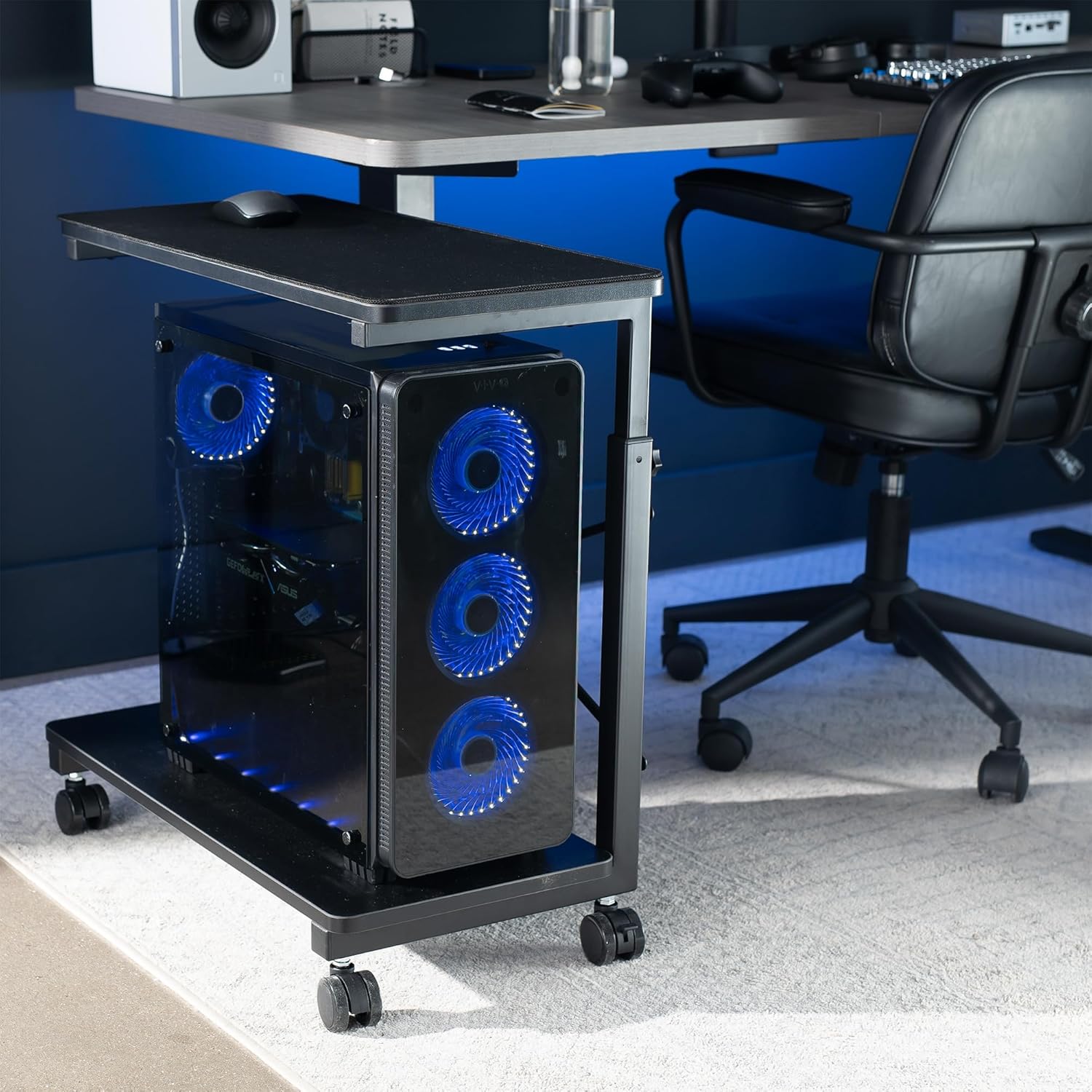
Your PC tower — the big rectangular box that actually runs your desktop computer — probably lives on the floor right now. Maybe it’s shoved under a desk, half-buried behind a cable nest, or balanced on a book someone optimistically called a “riser.” That arrangement works, until it doesn’t: dust accumulates faster at floor level, caster-less boxes get kicked during long sessions, and towers with side-panel mesh intakes (the vented openings that pull in cool air) press directly against carpet, which is about as good for airflow as a pillow over a face. A purpose-built rolling PC stand — essentially a low-profile wheeled shelf sized specifically for full-size computer towers — addresses all three problems. This guide explains how to choose one, why case width is the spec that actually determines whether a stand works for your machine, and how a rolling PC stand fits into a broader desk-floor ecosystem alongside utility carts for peripherals, network gear, and AV equipment.
If you’re already living in the details — you have a large-format case, you’ve burned through one vague “universal” stand, and you’re trying to figure out whether the VIVO stand will actually fit a dual-chamber build — start at the width section. That’s where the real decision lives.
Why Case Width, Not Weight, Is the Spec That Ends the Search
Most buyers arrive at PC stands anchored to the wrong number. They ask: “Can it hold 30 pounds?” Almost every stand on the market can hold 30 pounds. The question that actually filters the field is: “How wide is the interior platform, and does my case fit without hanging over the edge or jamming against the uprights?”
This distinction shows up clearly in aggregated owner reviews of the VIVO rolling PC stand. Reviewers who’d tried competing stands — including generic utility cart shelves and cheaper tower-specific options — report returning to VIVO specifically because competitors failed on internal platform width with dual-chamber or large-format cases. A dual-chamber case, for context, is a chassis design (popular in high-end custom builds) where the motherboard compartment and the power-supply/cable-management compartment are separated into distinct physical sections, producing a tower that’s wider and heavier than a conventional mid-tower.
The VIVO stand’s published interior platform dimensions are approximately 6.75 inches in interior depth and 9.5 inches in platform width (dimensions vary slightly by SKU; verify against the current VIVO spec sheet before purchasing). For most standard mid-tower cases — the ATX form factor that ships with the majority of pre-built desktops — that’s comfortable clearance. For extended-ATX or dual-chamber designs like the Lian Li O11 Dynamic series, it’s borderline, and reviewers are candid about it: at least one documented workaround involves using two VIVO units side by side under a single oversized case, with the tower straddling both platforms.
That’s a creative solution, but it’s also a signal. The O11 Dynamic XL, for example, has a footprint of roughly 11.2 inches wide by 11.8 inches deep — wider than any single-unit purpose-built stand currently covers at this price tier. If your case is in that size class, plan for the two-unit approach or size up to a general-purpose utility cart with a larger shelf footprint.
By the numbers — Common case widths vs. VIVO platform interior:
| Case category | Typical footprint width | Fits single VIVO stand? |
|---|---|---|
| Micro-ATX / mini-tower | 6.5–7.5 in | Yes, with room |
| Standard mid-tower (ATX) | 7.5–9.0 in | Yes, snug to comfortable |
| Full-tower / E-ATX | 9.0–10.5 in | Marginal — measure first |
| Dual-chamber (O11-style) | 10.5–12.0 in | No — two-unit workaround or utility cart |
Ventilation: When “Vented Shelf” Is Actually Meaningful
The VIVO stand’s shelf deck is perforated — it has a grid of open holes rather than a solid surface. At first glance, this reads as a design choice. Based on owner reviews and basic thermal reasoning, it’s a functional one, particularly for towers with bottom-mounted intakes.
Here’s the chain of logic: many mid-tower and full-tower cases draw cool air in through the floor of the case (through mesh filters on the bottom panel). When a case sits on a solid shelf — a standard utility cart tray, a wooden board, a carpet — that intake is partially or fully blocked. The case compensates by running fans harder, which increases noise and heat. Elevating the case on a stand, and giving the floor of that stand some open area, allows the intake to breathe.
This Old House editorial coverage of home office air circulation notes that even modest floor-level elevation (4–6 inches) meaningfully reduces dust accumulation at intake grilles, because coarser particulate (pet hair, carpet fiber) concentrates in the lowest 2–3 inches of room air. A rolling stand that lifts the tower 3–5 inches off the floor and leaves the shelf deck ventilated addresses both problems at once.
To be precise about what “vented shelf” doesn’t do: it’s not a substitute for proper case cooling, adequate case fans, or thermal paste maintenance. It removes a bottleneck; it doesn’t add capacity. If your system runs hot under load with good internal airflow, a stand won’t fix that. If it runs fine internally but is sitting on carpet blocking a bottom intake, a stand will help.
The contrast with a repurposed utility shelf is meaningful here. A standard DTK or SunnyPoint rolling utility cart — the kind home office buyers often already own for peripherals and paper — has solid steel or wire-grid shelves. Wire-grid shelves are better than solid steel for airflow, but the grid is typically not designed to position the case intake at the optimal gap, and the shelf height intervals aren’t calibrated for a tower’s center of gravity. Purpose-built PC stands solve a narrow problem better than general carts do.
Caster Performance: Hard Floor vs. Carpet, and the Vibration Question
Locking casters — wheels with a small lever that locks them in place once you’ve positioned the stand — are standard on purpose-built PC stands. The VIVO stand ships with four locking swivel casters. Owner reports on caster performance split by floor type:
On hard floors (hardwood, LVP, tile), the locking mechanism holds reliably. Reviewers note that even during extended gaming or heavy compute sessions where the GPU fan ramps up and produces some chassis vibration, the locked casters don’t migrate. The durometer (hardness) of the VIVO casters appears to be in the soft-to-medium range typical for furniture-grade wheels, which means they roll smoothly on hard floors without gouging.
On carpet, the picture is mixed in a way worth flagging. Locking casters on carpet do hold the stand in place, but carpet compression means the stand has a slight amount of give — not enough to cause instability, but enough that reviewers who sit near their towers report occasionally feeling a faint resonance through the floor during peak fan activity. This isn’t a flaw in the stand; it’s physics. Carpet is a compliant surface, and any wheeled stand on carpet will have less rigid coupling to the floor than the same stand on tile. If you’re running a liquid-cooled system with a 360mm radiator and three 120mm fans at max RPM, you’ll feel it slightly. For most workloads, owners report this is a non-issue.
HCD Magazine’s coverage of caster selection in mobile furniture notes that dual-locking casters (where both the swivel axis and the rolling axis lock independently) provide better resistance to vibration-induced migration than single-lock casters, which only stop the wheel from rolling but allow the swivel joint to wobble. The VIVO stand uses dual-lock casters — both axes lock — which is the right choice for equipment that vibrates during operation.
The Adjacent-Cart Ecosystem: Building a Complete Desk Floor
The most useful purchasing pattern in this category isn’t “buy a PC stand.” It’s “build a floor ecosystem.” Buyers who research PC stands in depth — and the review patterns around VIVO bear this out — are simultaneously sourcing adjacent rolling carts for the equipment that accumulates around a desktop workstation: network switches, NAS drives (network-attached storage, essentially a box of hard drives that stays on your network), UPS units (battery backups), AV receivers, and cable management channels.
Apartment Therapy’s home office organization coverage consistently identifies under-desk floor clutter as the primary ergonomic complaint in home office setups — and rolling carts that can be repositioned without unplugging everything are the most practical solution. The key is matching the cart to the load:
- PC tower: purpose-built stand, sized to your case width (see above)
- NAS or network switch: a compact utility cart with a solid shelf, since these don’t have significant intake ventilation concerns and benefit from a stable, vibration-dampened surface
- UPS battery backup: floor placement directly or on a low-profile platform cart; UPS units are heavy (15–30 lbs for a mid-range unit) and benefit from caster mobility for access during battery swaps
- AV receiver / streaming device stack: a utility cart with adjustable shelf heights accommodates varying component depths
The SunnyPoint and DTK rolling utility carts that appear in adjacent purchase patterns are serving these secondary equipment roles. They’re not optimized for PC towers — their shelf dimensions and deck designs aren’t purpose-built for it — but for the NAS, the UPS, and the cable staging area, a general utility cart is the right tool.
Frequently Asked Questions
What are the actual interior width dimensions of the VIVO stand, and will a dual-chamber case like a Lian Li O11 fit?
Per VIVO’s published spec sheets, the interior platform width is approximately 9.5 inches on the standard SKU. The Lian Li O11 Dynamic XL has a footprint of roughly 11.2 inches wide, which exceeds the single stand’s platform. The workaround that owners report is using two VIVO stands side by side, with the case bridging both platforms. It’s functional, if ungainly. If you’re running an O11-class chassis, measure your specific case model before purchasing.
Do the locking casters hold on both carpet and hard floors without the tower vibrating during operation?
On hard floors, owners consistently report solid hold with the dual-locking casters. On carpet, the stand stays put, but there’s a small amount of resonance transfer during high-fan-speed operation because carpet is a compliant surface. It’s not a stability problem; it’s a physics reality. If your system runs quiet (low fan RPM, passive-cooled GPU), it’s a non-issue on any surface.
Is the vented shelf design meaningfully better for airflow than placing a tower on a solid utility cart shelf?
Yes, for cases with bottom-mounted intakes. A perforated platform allows air to enter the case floor unrestricted, whereas a solid shelf partially blocks that intake. The effect is most meaningful for cases that depend heavily on bottom intake for their cooling path. For cases that intake primarily from the front or sides, the ventilation benefit is smaller, though floor-level elevation still reduces dust accumulation at intake grilles.
Can the VIVO stand be used for other heavy equipment like an AV receiver or network switch, or is it optimized only for PC towers?
The stand is physically capable of holding other equipment within its weight rating (manufacturer-rated at 66 lbs). The platform dimensions and railing design are optimized for a tower case’s footprint, so an AV receiver or rack-mount switch may feel awkward on it. For those components, a general-purpose rolling utility cart with adjustable shelves is a better fit.
What’s the weight limit for the top rolling shelf, and does it bow under a fully configured liquid-cooled tower?
The VIVO stand is rated by the manufacturer at 66 lbs total capacity. A fully configured liquid-cooled mid-tower — including a 360mm radiator, three SSDs, a high-end GPU, and a full ATX motherboard — typically weighs 25–35 lbs. That’s well within rated capacity. Owners with heavy custom builds report no observable shelf deflection or bowing at these loads. Extended-ATX or dual-chamber builds can approach 40–45 lbs, still within the rated limit, though as noted above, the platform width rather than the weight limit is the binding constraint for those cases.
The decision rule: If your case is a standard mid-tower ATX (the most common form factor in pre-built desktops), the VIVO rolling PC stand is the right-sized, right-featured tool — buy it, pair it with a utility cart for adjacent gear, and stop cable-managing around a floor-mounted case. If your case is a large-format dual-chamber design, measure the footprint against the stand’s published platform dimensions before purchasing, and budget for either the two-unit workaround or a larger utility cart shelf as your base. The case width is the number that determines your path.